Where tables actually live
A table is never stored — it is reconstructed. Two strategies, two failure modes, and the geometry that makes citations clickable.
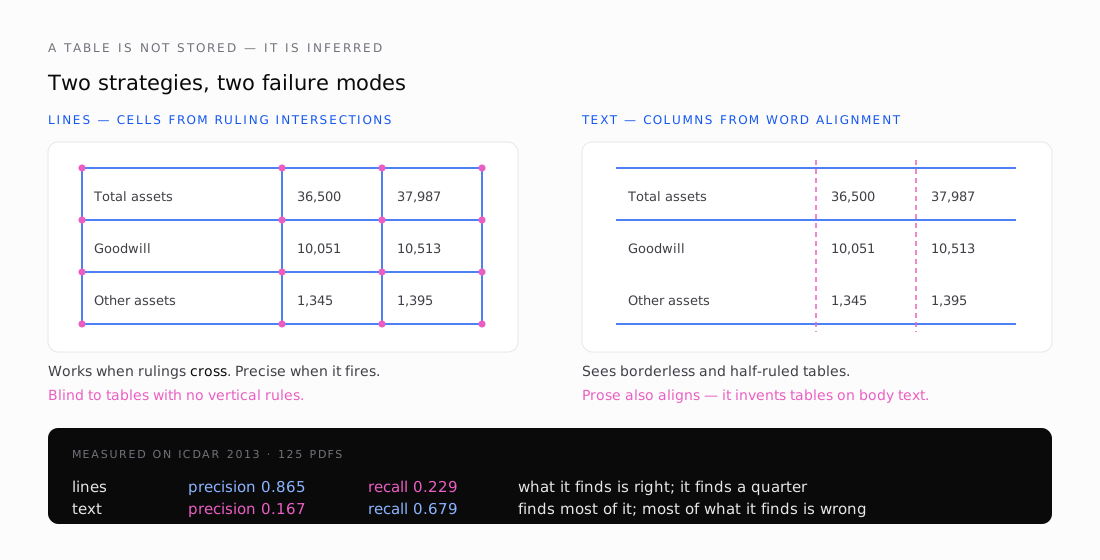
There is no table in a PDF. There is no <table> tag, no cell object, no row. There is a set of line segments and a set of glyphs, and the fact that a human looking at them sees a table.
So a table extractor is a reconstruction engine, and everything it produces is a hypothesis.
Two ways to guess
pdfplumber established the two approaches that everything else now uses, and pdftable implements both.
`lines` takes the vector graphics the page drew — line segments, rectangle outlines, curve segments that happen to be axis-aligned — and looks for places they cross. Each intersection is a potential cell corner. Walk the intersections, find closed boxes, and those are your cells.
`text` ignores drawing entirely and clusters word positions. Words sharing an X0 down the page suggest a column boundary; words sharing a vertical extent across the page suggest a row. Cluster, threshold, emit edges.
They fail in opposite directions, and the ICDAR 2013 benchmark makes the shapes obvious:
| strategy | precision | recall |
|---|---|---|
lines | 0.865 | 0.229 |
text | 0.167 | 0.679 |
lines is nearly always right and nearly always silent. text sees almost everything and is wrong most of the time — because prose has word alignment too, and nothing in the algorithm knows the difference between a table and a paragraph in a narrow column.
The failure I did not expect
lines needs rulings that intersect. That sounds obvious until you meet a table ruled only horizontally.
That style — a rule above the header, one below it, one at the bottom, and nothing vertical — is the house style of most government and academic publishing. LaTeX's booktabs package exists to enforce it. It looks clean, it is extremely common, and it produces zero ruling intersections.
On the ICDAR 2013 corpus, 28 of 125 documents had no table detected at all. Every one was ruled on a single axis:
us-017:  218 horizontal rules,   0 vertical
us-018:  226 horizontal rules,   0 vertical
us-024:  135 horizontal rules,   0 vertical
us-025:  225 horizontal rules,   0 vertical
The obvious fix is to use rules for one axis and word alignment for the other. pdftable supports mixed strategies per axis, so this needed no new machinery — only automatic selection. Part six covers what happened when I measured it, which was not what I predicted.
Not everything on a page is text or rules
Two other things show up and both need handling.
Rectangles. Many producers draw cell backgrounds as filled rectangles rather than stroking borders. Those four edges look exactly like a table grid to an edge detector — sometimes correctly, sometimes not. pdftable follows pdfplumber in offering lines_strict, which uses only genuine line segments and ignores rectangle outlines, for documents where the shading is decorative.
Curves. Bezier paths that happen to be axis-aligned are also candidate rulings. A rounded-corner box is a curve, not a rectangle, and dropping it loses a real boundary.
Images. An embedded image is opaque. If a page is a scan, there is no text layer at all and every technique in this series has nothing to work with. That is not a gap in the parser; it is a different problem requiring OCR, and part seven covers where that fits.
The bit that carries citations
Every primitive pdftable reports — glyph, word, line, rectangle, table, individual cell — carries a bounding box in PDF user space. Those coordinates are what make a citation clickable rather than a page number.
That space needs one conversion before a browser can use it. PDF puts the origin at the bottom-left with Y growing up; CSS, canvas, SVG and PDF.js all put it at the top-left with Y growing down. Invert it and the overlay mirrors vertically — which still looks plausible, because the boxes land on real rows, just the wrong ones.
pdftable does the flip once, in a tested helper:
r := table.CellsBBox[row][col].Normalized(page.Width(), page.Height())
// {left, top, width, height} as fractions of the page
Fractions rather than pixels, so the overlay survives zoom and resizing without recomputation.
Everything is already normalised before that: the MediaBox origin is translated to (0,0) and any /Rotate applied, so a rotated landscape page reports coordinates in the space a viewer displays. I verified this end-to-end by rendering a page to an image, projecting real cell boxes onto it, and confirming the highlights landed on the intended rows.
Next: Building pdftable — the architecture, the API, and why the whole thing is a deliberate port rather than an invention.